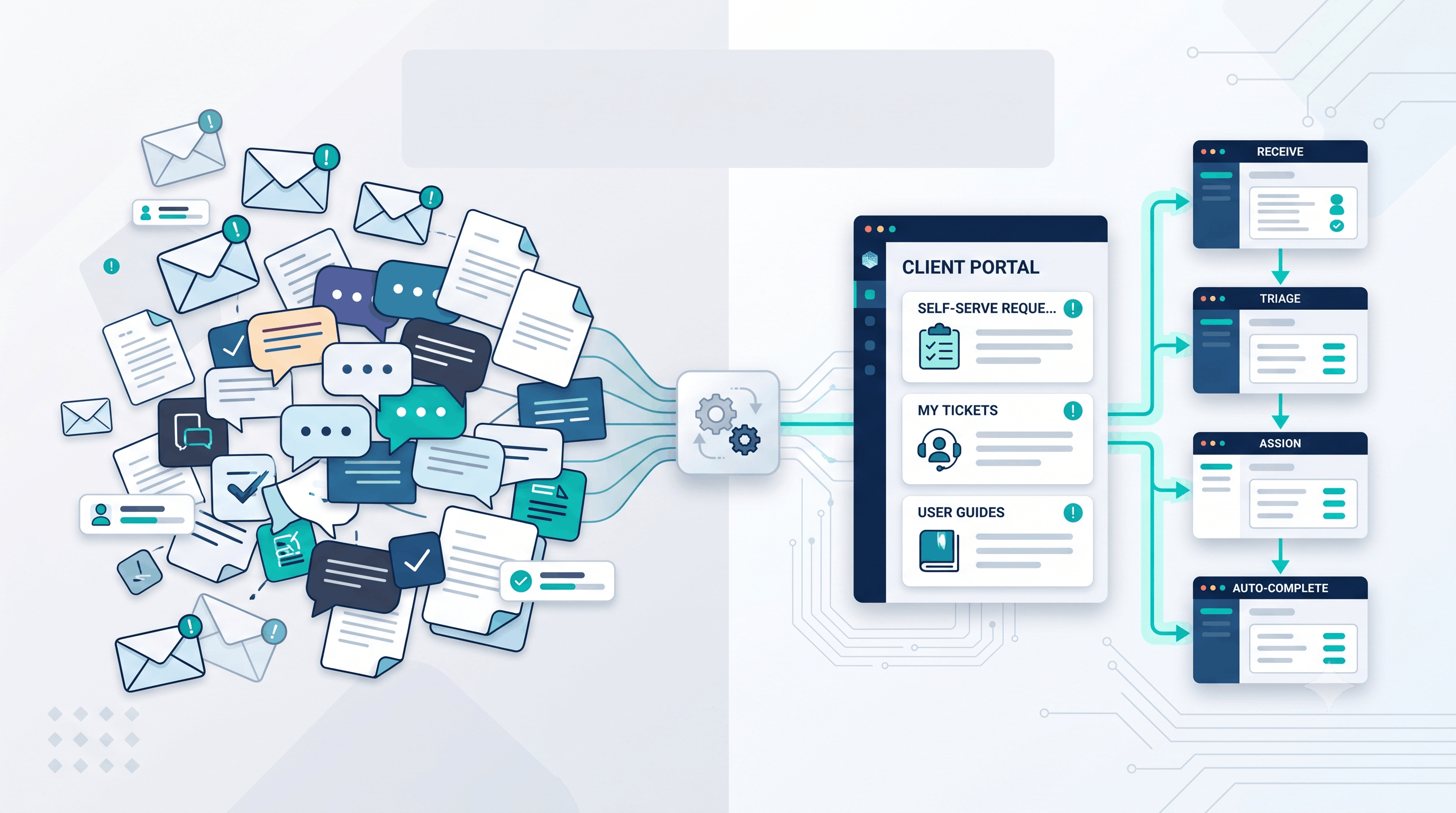
How to Turn Repetitive Client Requests Into Self-Serve Workflows
Posted on July 27, 2026 • 4 minutes • 826 words
Growing teams often lose time on the same client requests every week. Status updates, document re-sends, approval follow-ups, onboarding questions, and recurring data requests can quietly consume hours that should be spent on delivery and growth.
The problem is not that clients ask too much. The real issue is that many businesses still rely on inboxes, spreadsheets, chat messages, and manual handoffs for work that follows the same pattern every time.
A better approach is to convert repeated requests into self-serve workflows. Instead of waiting for someone on your team to respond manually, clients get a clear path to request information, upload files, check progress, or trigger the next step without creating unnecessary back-and-forth.
What a self-serve workflow actually means
A self-serve workflow is a guided process that lets a customer, client, or internal stakeholder complete a routine task without needing manual intervention for every step.
This does not mean removing people from important conversations. It means removing avoidable friction from predictable tasks.
Examples include:
- A client portal where customers can check project status.
- A structured form that collects complete requirements before work begins.
- An approval workflow that routes requests to the right person automatically.
- A document hub where invoices, contracts, and reports are always available.
- A support intake flow that categorizes requests and assigns priorities instantly.
Signs your team should build one
1. The same questions appear every week
If your team keeps answering “What is the status?” or “Can you send that file again?” then you are dealing with a workflow problem, not a communication problem.
Repeated questions are usually a sign that information is trapped inside people instead of being available through a system.
2. Requests arrive through too many channels
When work enters through email, WhatsApp, calls, Slack, and shared documents at the same time, requests become harder to track.
A self-serve workflow gives every request a single entry point and a consistent structure.
3. Important context gets lost
Manual processes often depend on memory. Someone forgets an attachment, skips a detail, or forwards the wrong version.
Structured forms, tracked statuses, and automated notifications help preserve context from the start.
4. Senior people spend time on low-value coordination
Leaders and specialists should not spend large parts of the week chasing approvals, resending files, or clarifying routine requests.
When valuable people are acting like human middleware, the business usually needs a better internal tool or workflow layer.
5. Clients experience avoidable delays
Even strong teams can appear disorganized when routine requests sit in someone’s queue waiting for a reply.
Self-serve systems reduce waiting time because the next step is visible, available, and easier to trigger.
Where businesses usually start
Most companies do not need a giant platform on day one. They usually start by identifying one repetitive process with clear business impact.
A few common starting points are:
- Client onboarding and document collection.
- Project status dashboards.
- Approval flows for quotes, designs, or deliverables.
- Recurring support or maintenance requests.
- Invoice and reporting access.
The best first workflow is the one that is frequent, structured, and painful enough that everyone already feels the inefficiency.
How to design a useful workflow
A self-serve process works best when it is simple for users and reliable for your team.
Focus on these principles:
- Create one clear entry point. Do not make users guess whether they should email, call, or message someone.
- Collect the right information up front. Good forms reduce follow-up questions.
- Show status clearly. People ask fewer questions when they can see progress.
- Route requests automatically. The system should know who needs to act next.
- Keep exceptions human. Unusual cases should still reach the right person quickly.
Why custom tools often matter
Off-the-shelf software can help, but many growing businesses discover that their actual process does not fit neatly inside generic tools.
That is where custom internal tools, portals, and workflow layers become valuable. They connect your forms, approvals, notifications, and records around the way your business already operates, instead of forcing your team to adapt to fragmented apps.
A practical solution might include a lightweight client portal, a request dashboard for your team, automated alerts, role-based access, and integrations with your current systems.
The business outcome
When repetitive client requests become self-serve workflows, teams usually see three immediate benefits: faster response times, better visibility, and less operational drag.
Clients get a smoother experience because they know where to go and what happens next. Your team gets fewer interruptions and more time for work that actually needs judgment.
Over time, these improvements compound. Fewer delays, fewer missed details, and fewer manual handoffs create a stronger delivery system and a more scalable business.
Final thoughts
If your team spends too much time answering predictable questions or coordinating routine requests, the fix may not be more hiring or more meetings. It may be a better workflow.
At Snowcorp, we help businesses turn messy request handling into clear digital systems that save time, reduce follow-up, and improve the client experience.